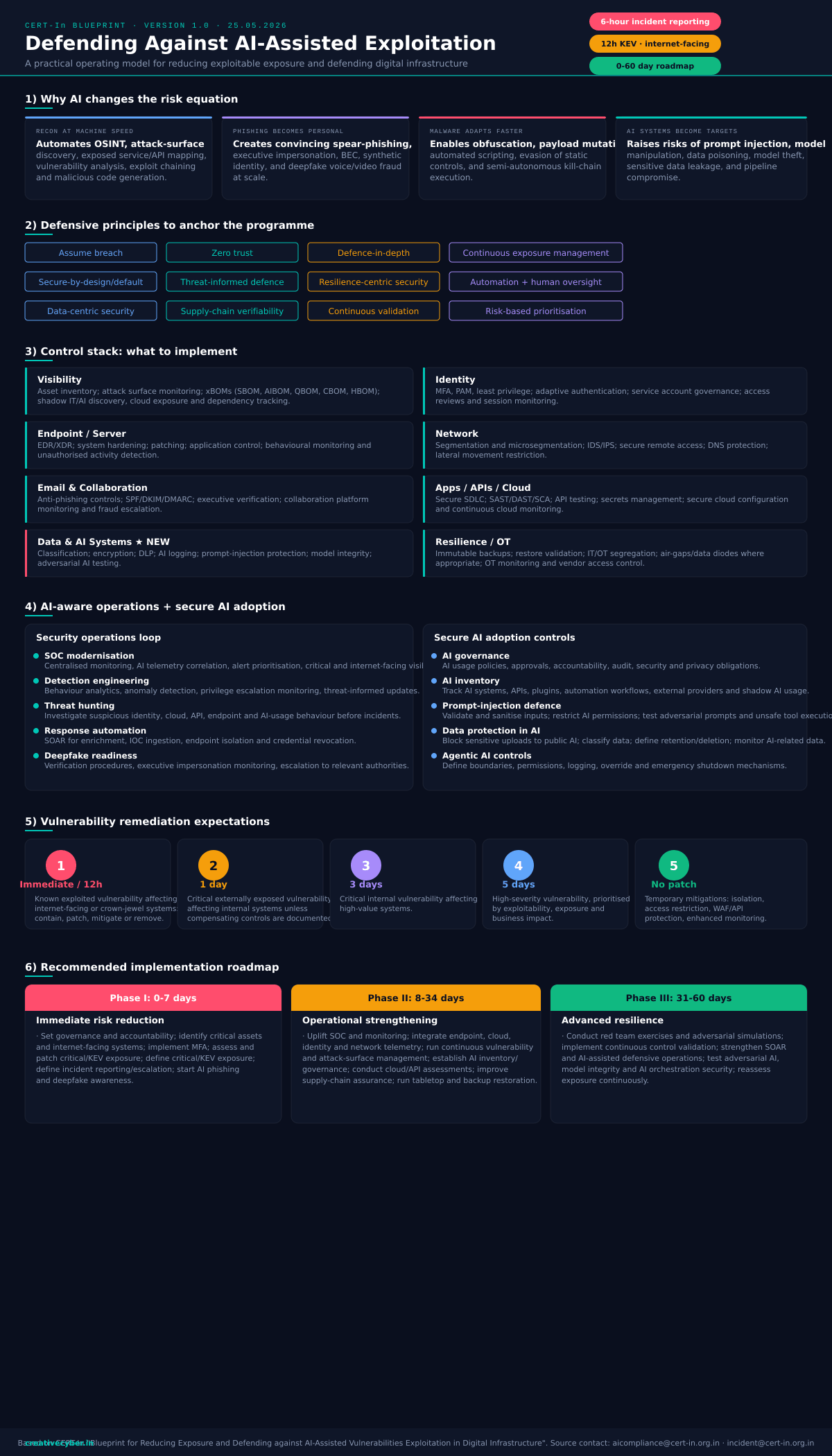
What the Blueprint actually changes
On 25 May 2026, CERT-In issued the “Blueprint for Reducing Exposure and Defending against AI-Assisted Vulnerabilities Exploitation in Digital Infrastructure” (Version 1.0). It is not a new compliance schema with its own control IDs. It is an operating model — a statement of how CERT-In now expects regulated entities to behave once attackers have AI doing reconnaissance, exploit-chaining, and malware mutation at machine speed.
The shift that matters for a BFSI practitioner is this: the document repeatedly says periodic, compliance-driven security is “required but may not be sufficient.” Your annual VAPT and your once-a-year tabletop are now the floor, not the ceiling. The Blueprint asks for continuous exposure management, continuous validation, and remediation windows measured in hours.
Below, each “impossible” expectation is broken down into what it really demands and the ground-level move that makes it deliverable on a real budget — not a slide.
Why AI changes the risk equation
The Blueprint frames four shifts. They are worth internalising because they explain why the timelines tightened — the gap between a vulnerability being disclosed and being weaponised has collapsed.
Discovery is now automated
OSINT aggregation, exposed-service and API mapping, vulnerability analysis and exploit chaining run continuously. Your attack surface is enumerated faster than you re-scan it.
Impersonation at scale
Convincing spear-phishing, executive impersonation, BEC, and deepfake voice/video fraud — tuned to each target. Awareness training alone no longer detects it.
Payloads that mutate
Obfuscation, payload mutation, automated scripting and evasion of static controls. Semi-autonomous kill-chains lower the skill bar for the attacker.
Your own AI is in scope
Prompt injection, model manipulation, data poisoning, model theft, and pipeline compromise. The copilots you deployed last quarter are now an attack surface.
The “impossible” remediation clock — decoded
This is the table that makes CISOs wince. Read it carefully and a pattern emerges: the aggressive windows apply only to a small, specific slice of your estate.
| Finding type | Window | What it really means for you |
|---|---|---|
| Known-exploited (KEV) vuln on internet-facing / crown-jewel system | 12 hours | Contain, patch, mitigate or remove exposure. A WAF/virtual patch counts as containment — it stops the clock while you schedule the real fix. |
| Critical, externally exposed vulnerability | 1 day | Also covers KEV on internal systems — unless you have documented compensating controls. |
| Critical internal vulnerability on high-value systems | 3 days | Buys you a planned change window. Use your normal CAB, not an emergency one. |
| High-severity vulnerability | 5 days | Prioritised by exploitability (EPSS) and business impact — not raw CVSS. |
| No patch available | Mitigate | Isolation, access restriction, WAF/API protection, enhanced monitoring, or feature disablement — documented — is an acceptable interim state. |
Meeting the 12-hour KEV window without a 24×7 patch team
The 12-hour expectation is survivable because it scopes itself. Three moves make it operational:
- Tag your crown jewels before the incident, not during it. In your CMDB or asset register, flag every internet-facing asset and every system that touches money movement, core banking, or bulk customer PII. For most mid-sized BFSI entities this is 20–60 systems, not thousands. The 12-hour clock only ever runs against this tagged set.
- Pre-authorise an emergency change path. Write a standing change-approval rule: “A KEV-listed CVE on a crown-jewel asset is pre-approved for emergency mitigation; CAB ratifies after the fact.” Get it signed by the CISO and Head of IT once. Now you are not waiting on a committee at 11pm.
- Treat virtual patching as a first-class containment. The Blueprint explicitly accepts “mitigate or remove exposure.” A WAF rule, an ACL change, taking the service off the internet, or a feature flag is a legitimate way to stop the clock. Land the kernel/library patch in your next planned window.
The 6-hour reporting clock — turn it into a 30-minute drill
The Blueprint reiterates CERT-In's standing direction: report cyber incidents within 6 hours. The single most common — and most expensive — misunderstanding is when the clock starts.
Make it muscle memory:
- Pre-fill the format. Keep the CERT-In incident-reporting fields as a saved template with everything that never changes (entity name, CIN, sector, points of contact, CERT-In portal credentials) already populated. Under pressure you only fill the incident-specific lines.
- Name the clock-owner in the runbook. One named role — not “the SOC” — owns “has the 6-hour report gone out?” If that person is unreachable, the deputy owns it. Reporting failures are almost always ownership failures.
- Rehearse it in your tabletop. Every drill should include an inject that forces the team to actually open the reporting template and draft the holding report against a timer. Most teams discover their template is stale only when they practise.
The control stack — and the one column most teams skip
The Blueprint's technical controls map cleanly onto familiar domains. Reproduced below so you can self-audit which columns you genuinely operate (not just own a policy for).
Seven of those eight columns are things a mature BFSI team already does in some form. The one that is genuinely new — and the one most likely to be an empty policy — is Data & AI Systems.
Defending your own AI: prompt injection and agentic controls
This is the section that did not exist in earlier CERT-In guidance. If you have shipped an LLM copilot, a RAG assistant, or any agent that can call tools, the Blueprint now treats it as critical infrastructure to be defended. The good news: the controls are concrete.
- Treat every model input as untrusted. Validate and sanitise external inputs before they reach the model. Content retrieved by a RAG pipeline is input too — a poisoned document is a prompt-injection vector.
- Allow-list tools, don't deny-list them. An agent should be able to call only the specific tools its task needs. Any action that moves money or touches customer data sits behind a human-approval gate — never fully autonomous.
- Build a kill-switch and log every prompt. The Blueprint's agentic-AI control asks explicitly for “override and emergency shutdown mechanisms.” Maintain AI activity logs (prompt, tool-call, output) and correlate them into your existing SIEM, the same way you'd treat any privileged session.
- Adversarial-test before release. Run a fixed battery of prompt-injection and jailbreak prompts against every model change. This is the AI equivalent of a regression test — cheap, repeatable, and exactly the “adversarial testing” the Blueprint names.
Continuous validation without a red-team budget
“Continuous exposure management” and “continuous validation” sound like they require headcount you don't have. They don't — they require cadence.
- Make attack-surface monitoring a weekly job, not an annual one. A scheduled external scan of your internet-facing assets, reviewed every week, is “continuous” enough to satisfy the intent — and catches the exposed service before the AI recon does.
- Run quarterly internal purple-team exercises with free tooling. A half-day exercise mapping a handful of ATT&CK techniques against your detections, documented with date, scope, findings and fixes, is an adversarial simulation. You do not need an external red team every quarter to demonstrate continuous validation.
- Use CERT-In empanelled auditors where it counts. For the independent-assurance layer, the Blueprint points to CERT-In empanelled organisations and the Comprehensive Cyber Security Audit Policy Guidelines. Use them for the annual deep audit; use your own cadence for the 51 weeks in between.
The 0–60 day roadmap, sequenced for a lean team
The Blueprint closes with a three-phase rollout. Here it is, with the sequencing that matters when you can only do a few things at once.
- Name accountability & governance
- Identify crown-jewel & internet-facing assets
- Enforce MFA on critical access
- Patch critical / KEV exposure
- Enable baseline logging
- Confirm the 6-hour reporting path
- Start AI-phishing & deepfake awareness
- Uplift SOC & telemetry correlation
- Continuous vuln & attack-surface mgmt
- Stand up AI inventory & governance
- Cloud / API security assessments
- Supply-chain assurance (SBOM)
- Tabletop + backup-restoration tests
- Red-team & adversarial simulations
- Continuous control validation
- Strengthen SOAR & AI-assisted defence
- Adversarial AI & model-integrity tests
- Reassess exposure continuously
A 10-line readiness self-check
If you can tick all ten honestly, you are operating the Blueprint — not just owning a policy that references it.
CERT-In AI-Blueprint readiness
Explore RiskSage →